Rapport Campus: School Bus and School Management Platform for Qatar
Rapport Campus runs the school bus and the school on one platform: every child accounted for from the bus stop to the classroom, with attendance, admissions, fees, staff, WPS payroll and parent updates in one place. Four apps — Console, Crew, Teach and Family — in English and Arabic, built by Rapport Group on the Trackntraces platform already tracking 15,000+ vehicles in Qatar.
A school runs two operations every day, and most run them on phone calls, paper and WhatsApp groups. On the bus, parents ring the office to ask where it is, nobody can prove who boarded and where, a child can get on the wrong bus or be left on board, and pickup changes arrive by phone minutes before the bus leaves. In the school, registers, homework and marks sit in separate books, fees are chased one parent at a time, payroll and the WPS salary file are prepared by hand, and circulars get lost in busy class groups.
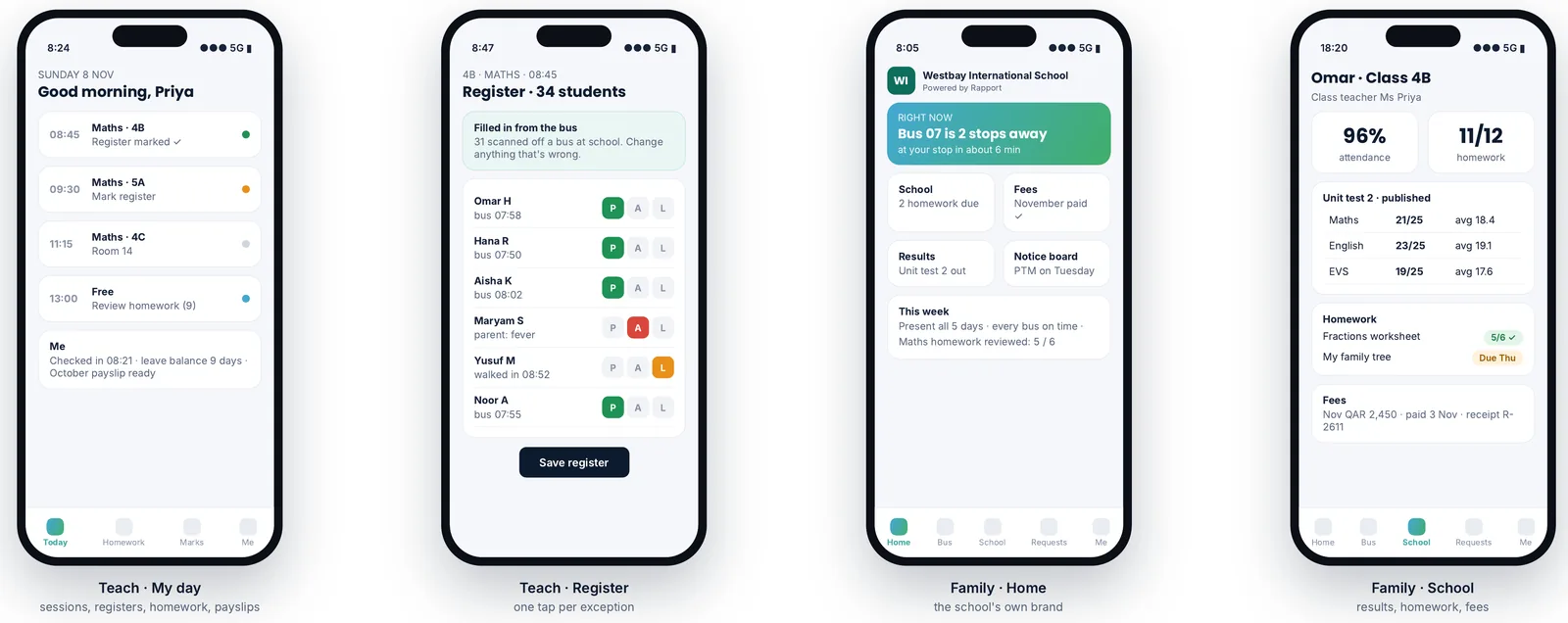
Rapport Campus is one system with four apps. Console runs in any browser for the principal, office, accounts, transport desk and HR. Crew is the Android app drivers and attendants use at the bus door. Teach is for teachers and staff, and Family is for parents, on Android and iPhone. Every screen works in English and Arabic (right to left), carries the school’s own logo and colours, and shows each person only what their role allows: an accounts clerk sees fees, a transport in-charge sees buses.
It is built on Trackntraces, the GPS and IVMS platform Rapport has run in Qatar since 2018. Bus positions come from the attendant’s phone or from a Teltonika tracker on the bus, so GPS hardware is optional: an Android phone at the bus door does the work, and a school that already has trackers on Trackntraces keeps them.
Turn on only the modules your school needs: Transport, Academics, Admissions, Fees, Staff, leave and payroll, Announcements and WhatsApp, and Income and expenses, with Questie AI learning as an add-on. Many schools begin with Transport and add Academics, Fees and Payroll when they are ready, and the data carries over. A school can be live in days, not months: we load the stops, students and routes with you, train the office, teachers and bus crews, and trips start the next morning.
Inside the platform
See Rapport Campus at work
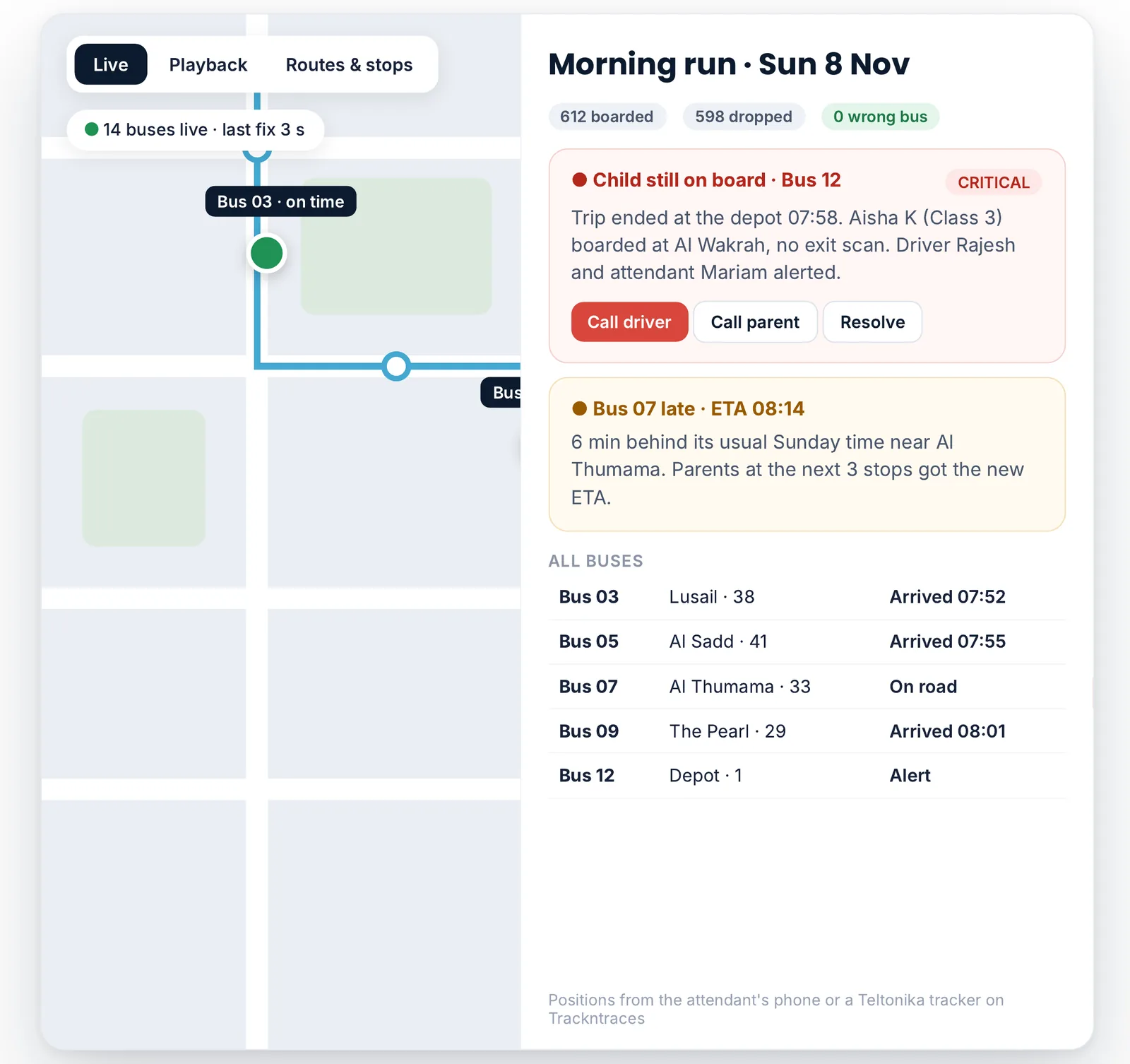
Live transport mapEvery bus on one map. A child still on board after the trip ends raises a critical alert, with buttons to call the driver and the parent.
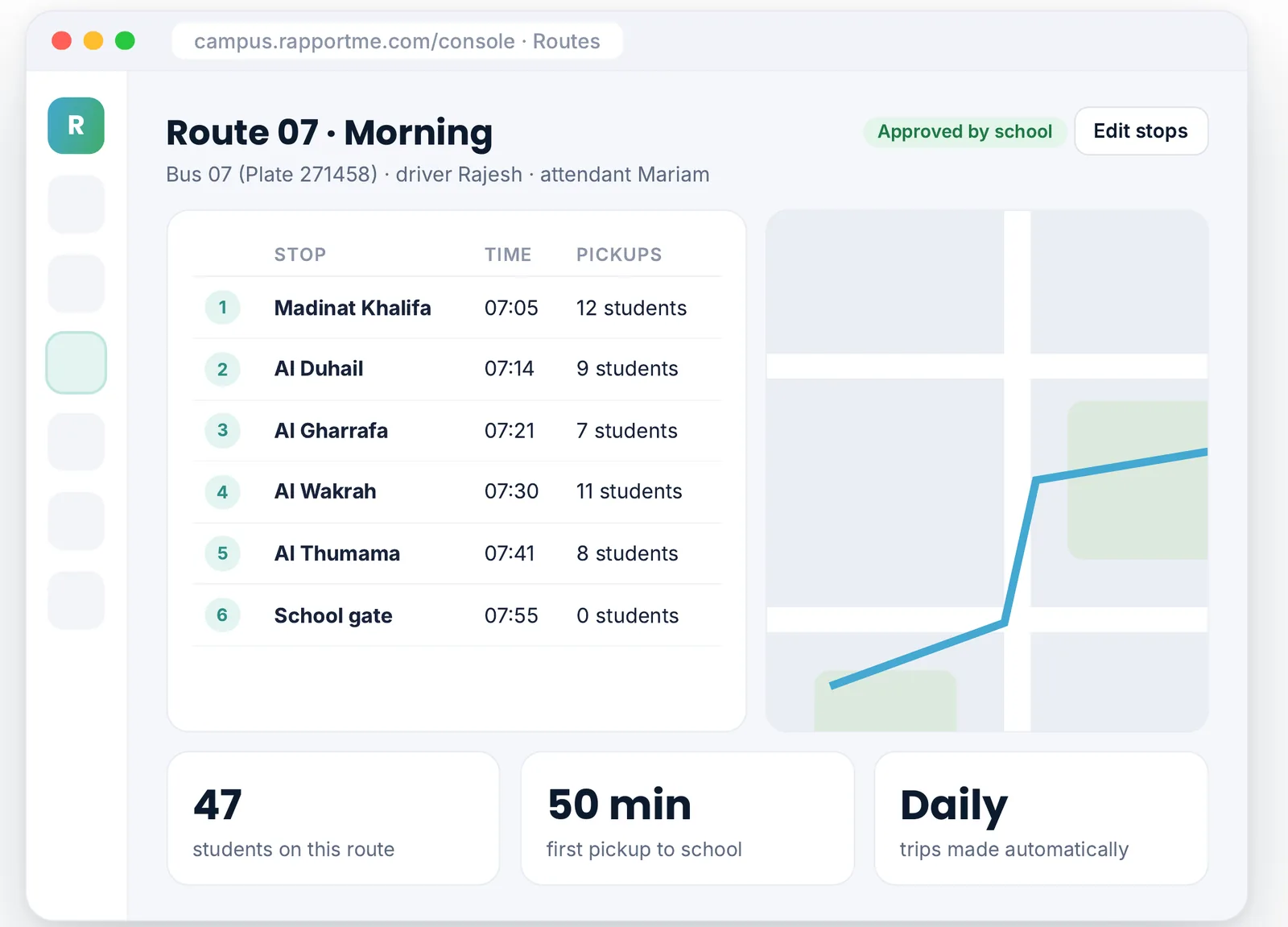
Routes and stopsEach route lists its stops, pickup times and student counts, approved by the school. Trips are created automatically every day.
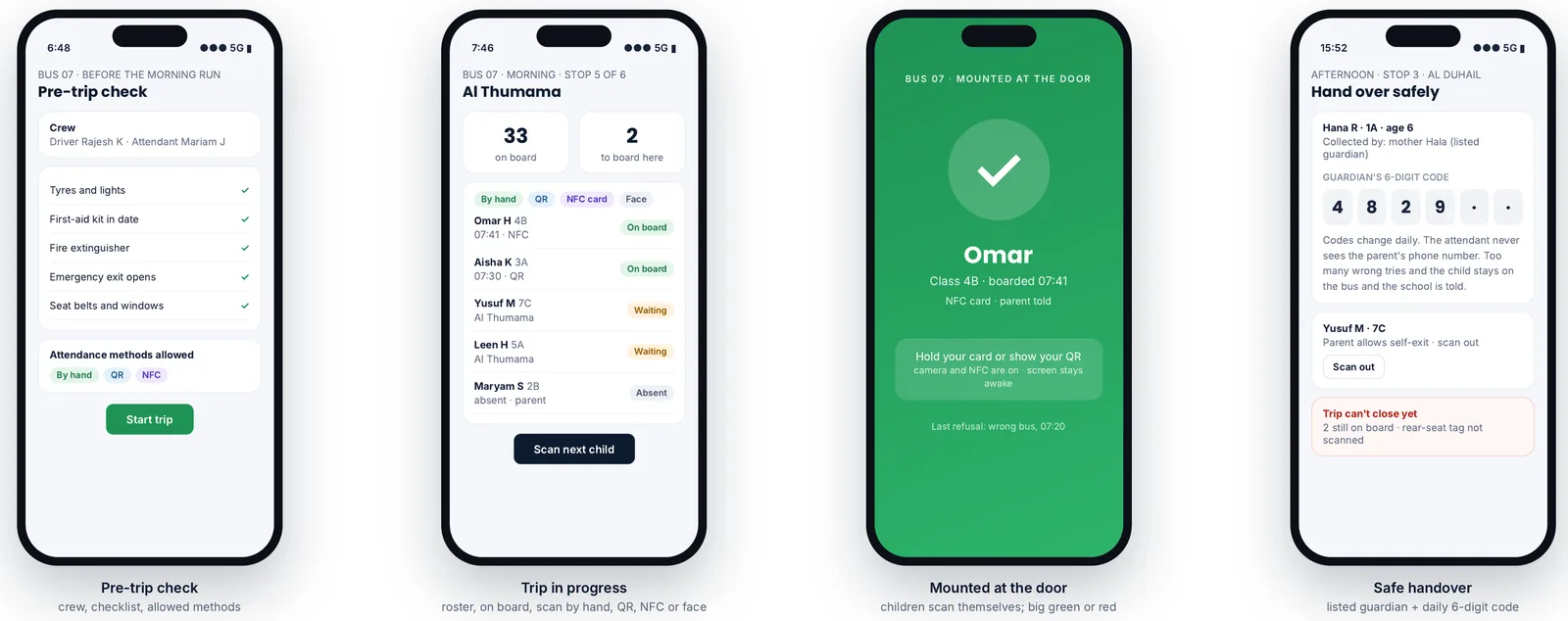
Crew app at the bus doorPre-trip check, a live roster as children board by hand, QR, NFC or face, and a safe handover with the guardian's daily code.
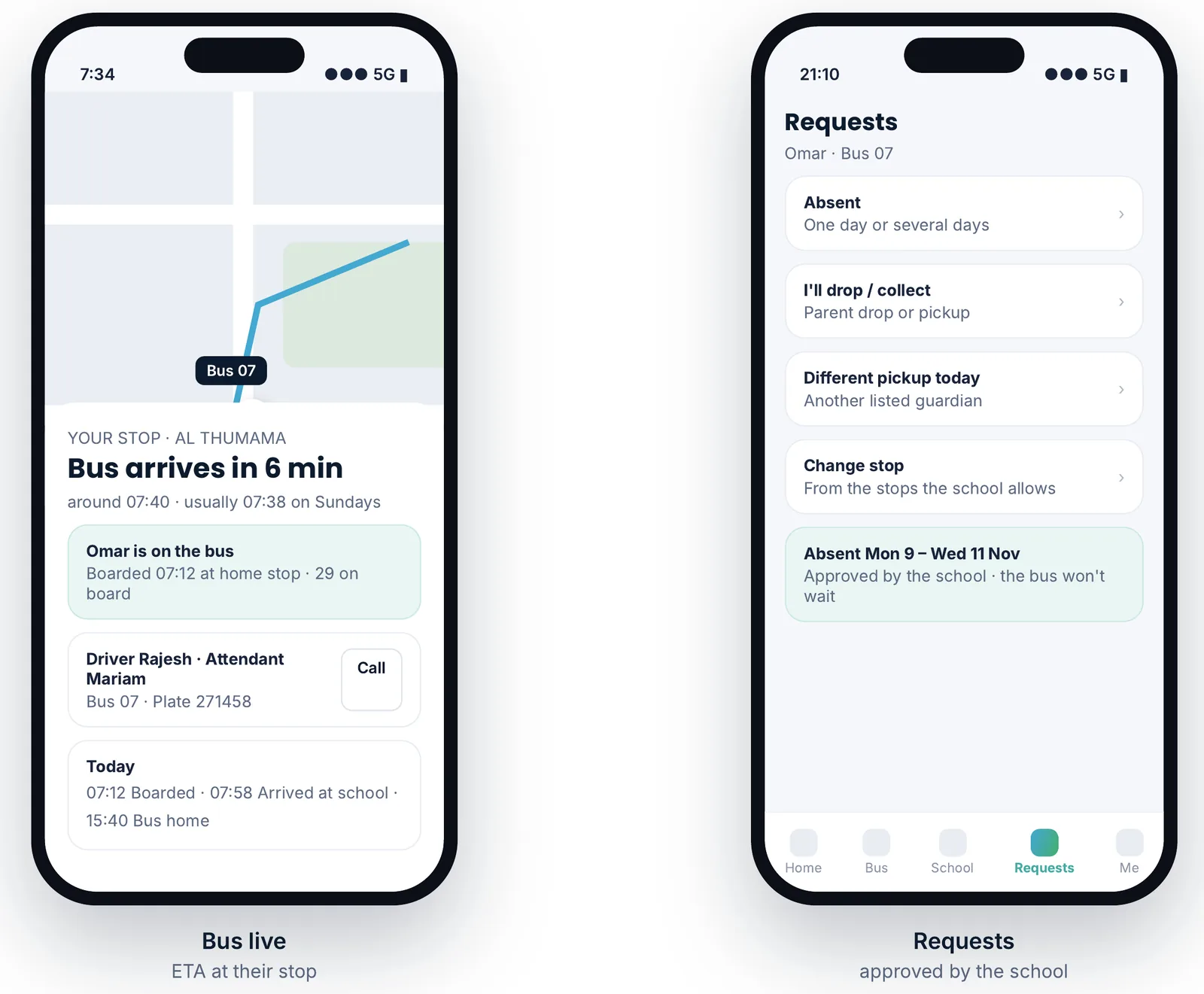
Family app for parentsLive ETA to their stop, who is driving, and requests such as absent days or a different pickup, approved by the school.
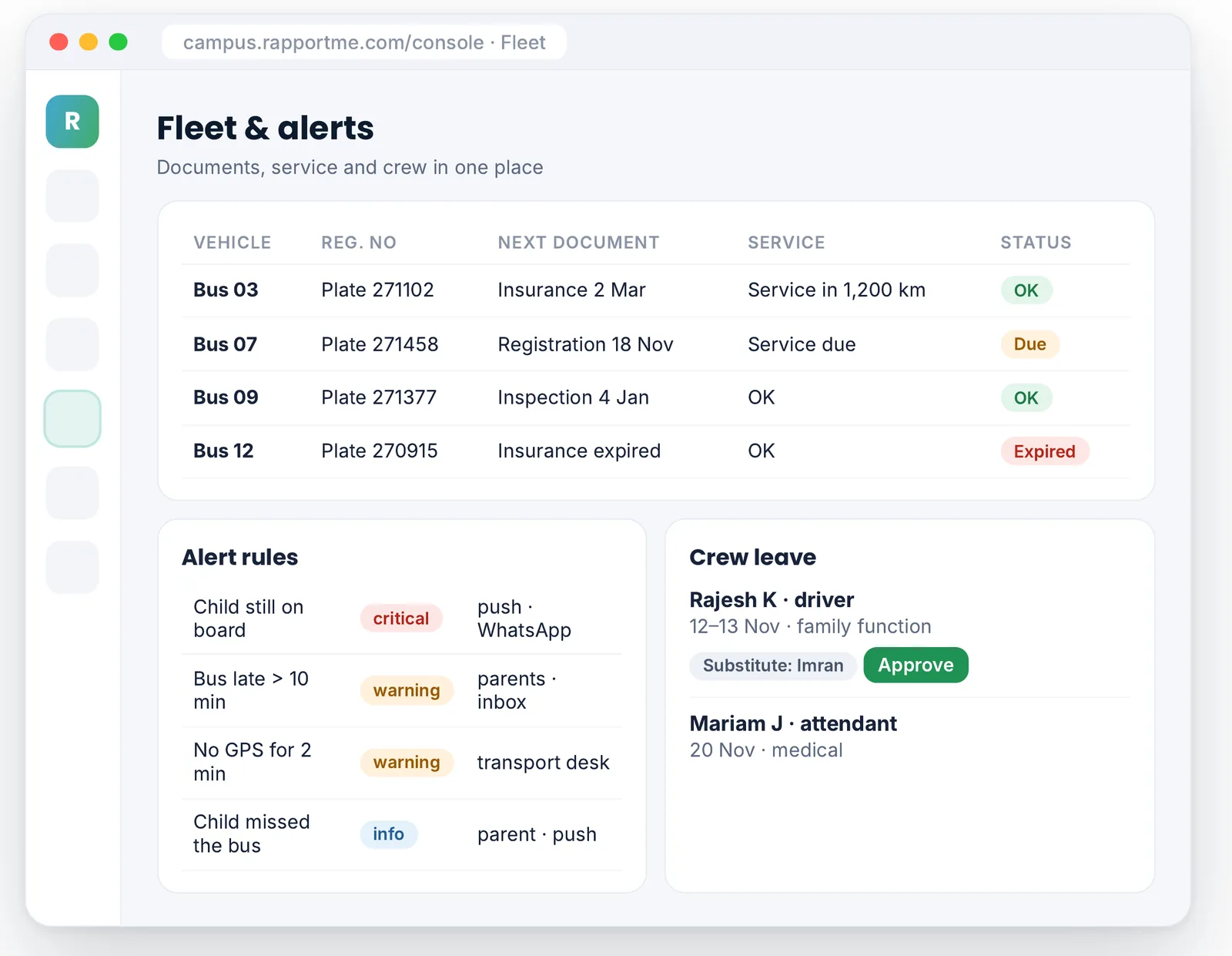
Fleet, documents and alertsInsurance, registration and service dates for every bus, alert rules by severity, and crew leave with substitutes.
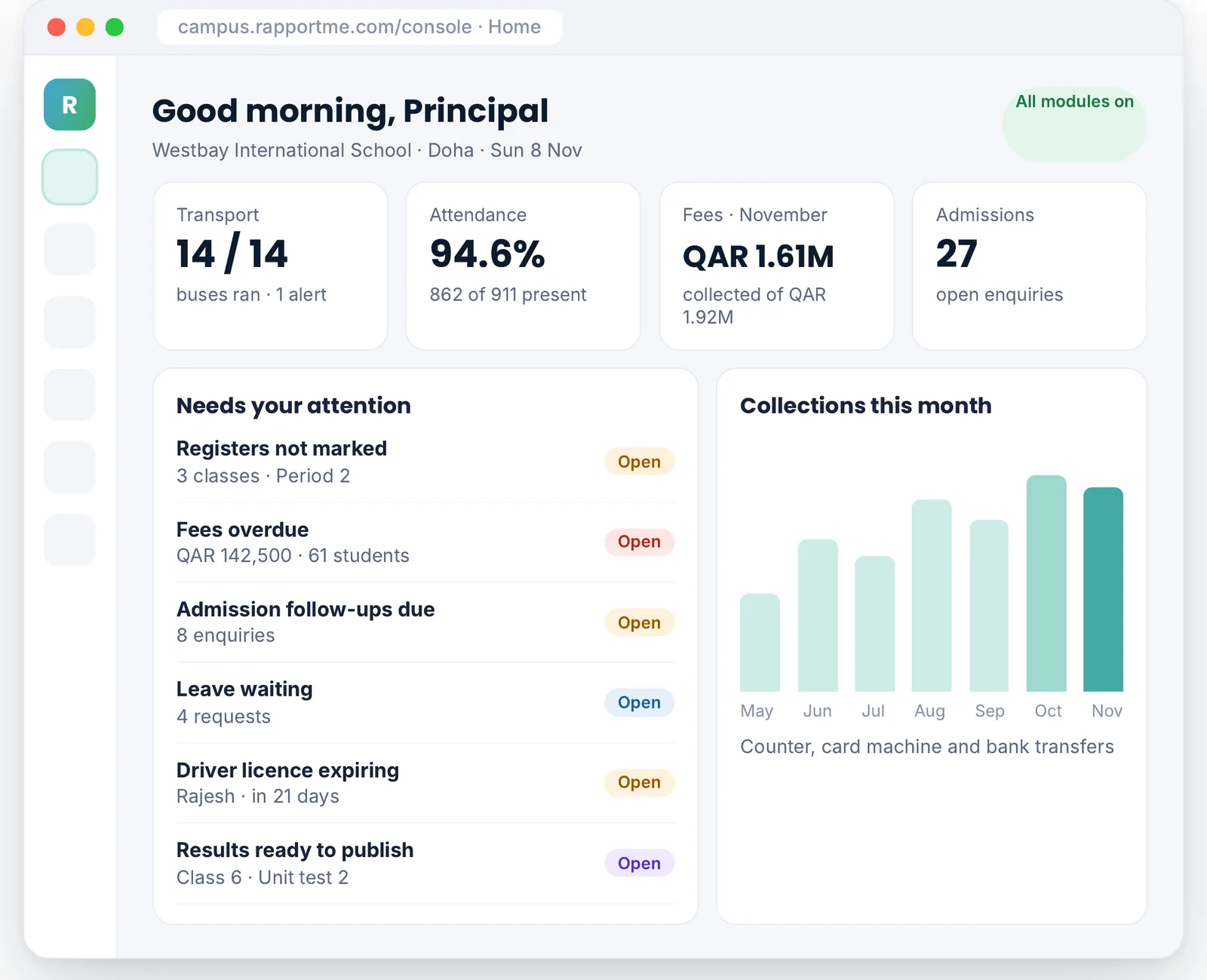
The principal's home screenTransport, attendance, fees and admissions on one page, with what needs attention today.
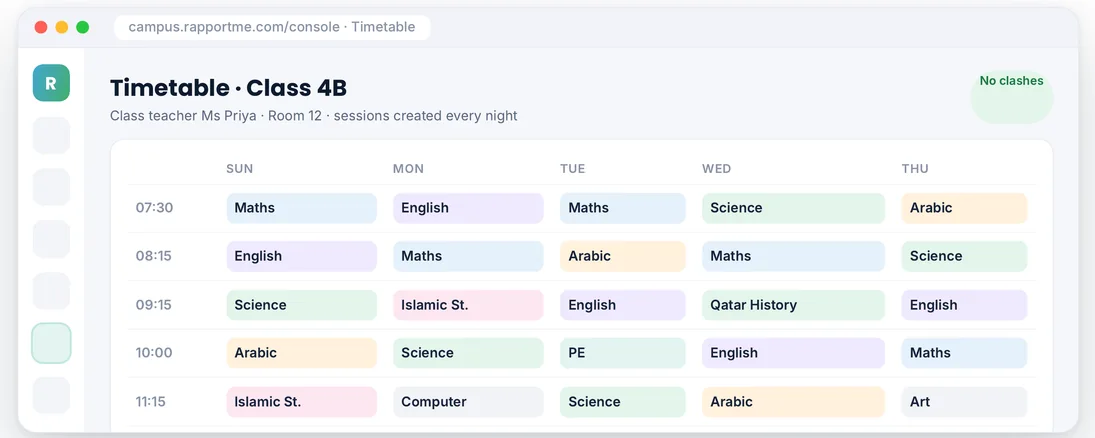
TimetableClass timetables with clash checks. Sessions are created every night, and registers start from the bus scans.
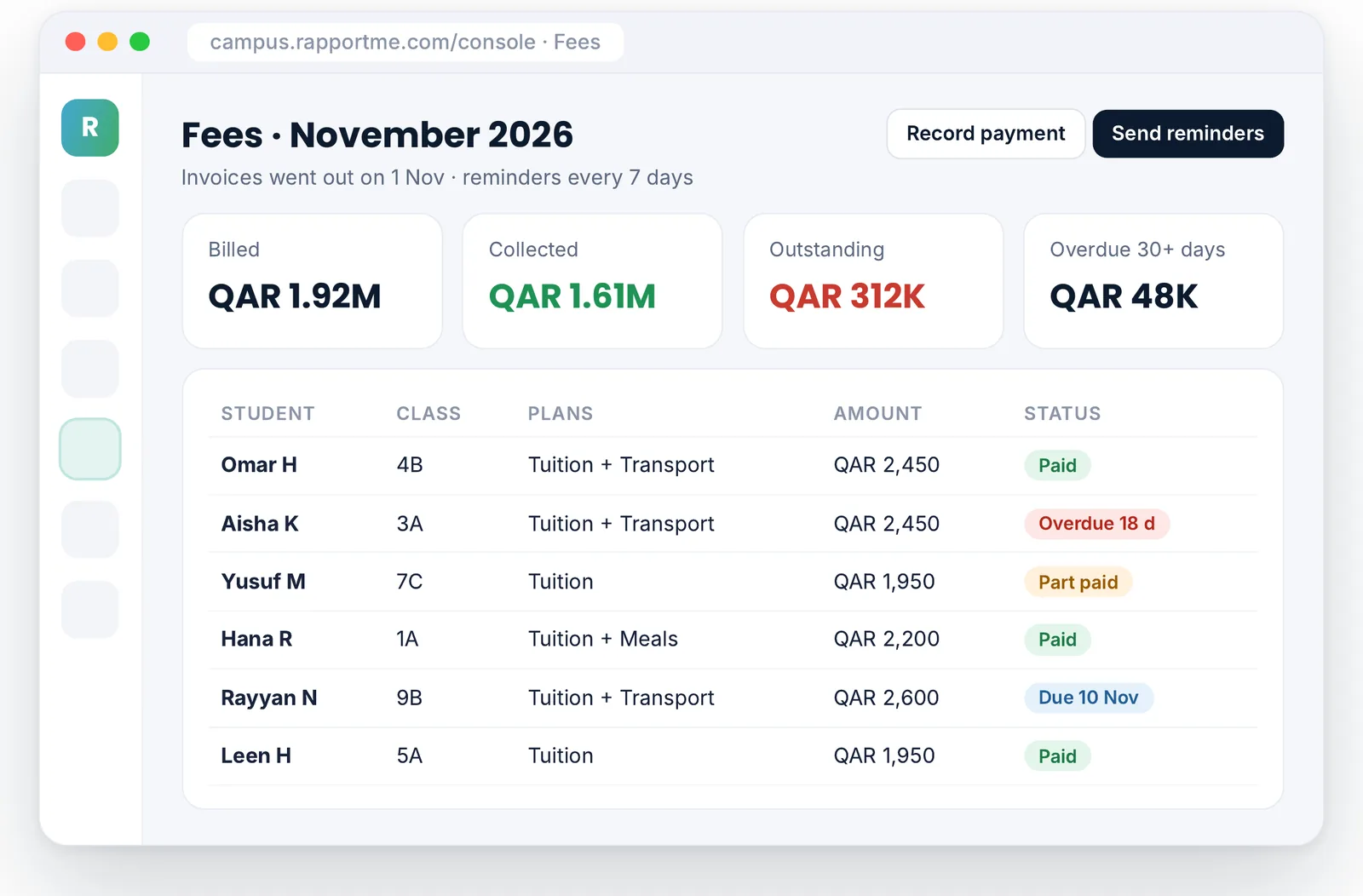
FeesInvoices and reminders go out on their own. Billed, collected, outstanding and overdue at a glance.
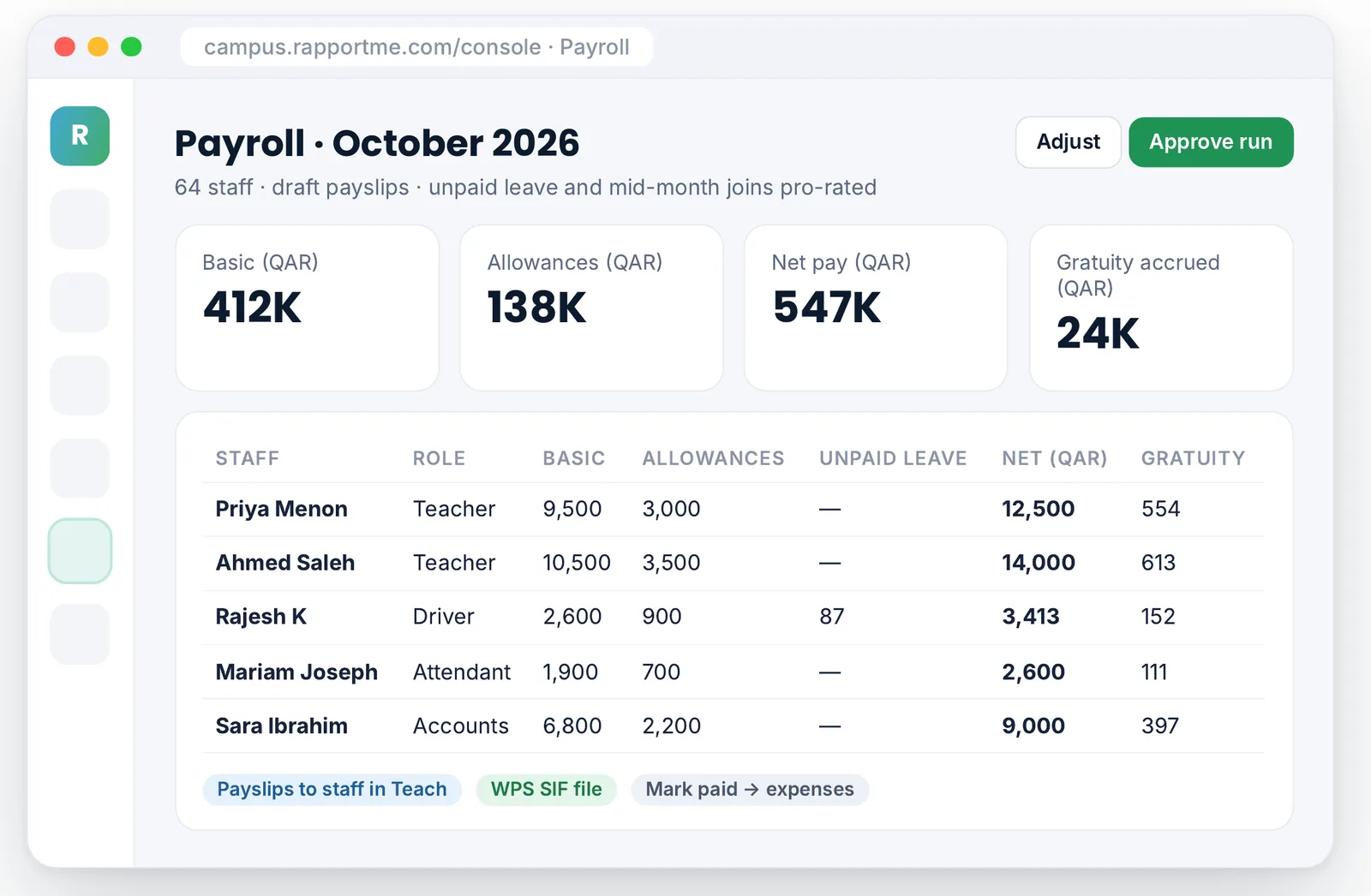
Payroll with WPSMonthly payroll with allowances, unpaid leave and gratuity, payslips to staff, and the WPS SIF file for the bank.
Teach and Family appsTeachers see their day, registers and payslips. Parents get an app in the school's own name with homework, results and fees.
One platform, four apps
What Rapport Campus covers
01
Live transport: every bus on one map, with who is on board
Boarded, dropped and wrong-bus counts for each run, and the live position of every bus from the attendant’s phone or a Teltonika tracker. “Child still on board” raises a critical alert to the driver, attendant and transport desk. The ETA at each stop is learned from the last four weeks, and parents at the next stops are told when a bus runs late.
02
Routes, stops and trip playback
Stops belong to the school, each with a name and a pin, and students are placed on their stop. Routes set the stop order, times, bus, driver and attendant, and the school approves them; morning and afternoon trips are then created every day. Playback replays any past trip with positions, every scan and every alert. Run your own buses or use a transport agency, which sees only its own routes and only while its contract is live.
03
Crew app: an Android phone at the bus door
A pre-trip check of tyres, lights, first-aid kit, fire extinguisher, emergency exit and seat belts before the run. Children are checked on and off by hand, by QR on the ID card or app, by NFC card (13.56 MHz) or by face with parent consent. Mounted at the door, the phone lets children scan themselves with a big green or red answer. Scans are saved offline and upload later with no duplicates.
04
Safety rules the system enforces
A scan on a bus the child is not assigned to is refused and logged. A trip cannot close while anyone is still on board, or before the rear-seat tag is scanned. Young children are handed over only to a listed guardian whose daily 6-digit code checks out, and repeated wrong codes lock it. Every boarding and drop is permanent, corrections need a reason, and drivers, attendants and agencies never see parents’ phone numbers.
05
Family app for parents
Parents see their own child only: boarded, arrived at school and handed over, each with the time, plus the bus on the map, the ETA at their stop and a “bus is near” alert. Requests go to the school for approval: absent for several days, a parent drop or pickup, a different guardian today or a permanent stop change. Each parent chooses push, WhatsApp, app inbox or email, and siblings share one family login.
06
Fleet, crew and alerts for the transport desk
Alert rules for a late start, no GPS, no driver, a child still on board, a child who missed the bus, delays and incidents, sent by pop-up, inbox, push, WhatsApp or email; critical alerts cannot be switched off. Vehicle registration, insurance, inspection and service due come with reminders, and crew leave is approved with a substitute named in one step.
07
The principal’s view and Student 360
One screen to start the day: buses, attendance, fees, admissions and staff, with “needs your attention” for registers not marked, fees overdue, follow-ups due, leave waiting, documents expiring and results to publish. Each child has one page with class, roll number, bus and stop, attendance on the bus and in class, homework, results, fees, guardians and consent per feature.
08
Academics: timetable, registers, homework and results
A timetable with no clashes creates every session overnight. The register opens already filled in from the bus gate, so teachers tap only the exceptions and parents hear about an absence the same period. Homework is set per class with a due date, children hand in a photo, and teachers score and comment. Marks reach parents only when the school publishes them, and report cards print one child or the whole class as PDF.
09
Admissions, from enquiry to enrolled
Enquiries from the school website land on the board with walk-ins and calls, and move from new to contacted, visit, applied and admitted, with follow-up dates. Admitting a child creates the student and parent login, links siblings, enrols the child in a class, attaches the fee plans and can raise the first invoice in one step, with nothing typed twice.
10
Fees that invoice and remind on their own
Fee plans for tuition, transport, meals, activities and one-off charges, monthly, termly or yearly. Invoices go out on the school’s invoice day and parents see every invoice, receipt and balance in the app. The desk records cash, cheque, card or bank transfer with numbered receipts; reminders go by app and WhatsApp, dues are grouped by age, and voids need a reason. Online payment from the parent app is coming next.
11
Staff, leave and payroll with Qatar WPS
The approved payroll run exports the WPS SIF salary file for the bank, and end-of-service gratuity is accrued every month for each employee. Runs go from draft to approved to paid, with joins, exits and unpaid leave pro-rated, and housing and transport allowances on every payslip. Staff get payslips and request leave in the Teach app, check in from their phone within 300 m of the school, and HR is alerted before a QID, passport, visa, contract or licence expires.
12
Announcements and WhatsApp
Send to everyone, all parents, a class, a grade, a bus route, staff or chosen students, and see the reach before you send. The app inbox always gets it, with push, WhatsApp and email as extra channels. Templates fill in each family’s child, month and balance due; messages can be scheduled, pinned to the notice board and checked for who has read them.
13
Questie: an AI learning buddy, as an add-on
A daily learning path for the child’s grade from KG to Class 12, in English or Arabic, with a Buddy tutor that asks guiding questions and never hands over answers. Parents and the school can see every chat, mistakes come back as Fix-it practice, and it runs only with the parent’s permission. Children’s surnames, phone numbers and addresses are never shared with the AI.
14
Built for children’s data
Access is decided by the server, not the app, with tested rules for every role and 1,282 automated checks run on every change. Parent consent is recorded per child and per feature with a full history, and AI features check it first. Deleting hides a record and keeps it, attendance corrections need a reason, and the platform runs on Rapport’s own servers with nightly backups kept for 14 days, in line with Qatar’s PDPPL.
Pricing
How Rapport Campus is priced
Per student per month, per module, with a lower rate for each module a school adds. A school pays for the modules it turns on, and adds the rest when it is ready.
01
Module fees, per student per month
Transport, Academics, Admissions, Fees, Staff and payroll, and Announcements are priced per enrolled student per month. Quoted by student count and the modules chosen.
02
Phones or GPS trackers on the buses
Bus positions can come from the attendant’s Android phone at no hardware cost. For a fixed tracker, each bus carries a Teltonika unit fitted by Rapport’s own technicians on a per-vehicle plan with data SIM and support, the same model Rapport’s transport customers already run.
03
What the school needs
A computer for the office, an Android phone per bus, and NFC or QR ID cards if the school wants card scanning. Nothing else: GPS trackers are optional.
04
Questie and set-up
Questie AI learning is an add-on priced per student. Set-up, data loading and training for the office, teachers and bus crews are included, and quoted with the school’s plan.
Send the number of students and buses and the modules you are interested in to info@rapportme.com or WhatsApp +974 6605 4805, and we will show you a 30-minute demo on your own routes and classes, with a quote. Schools in India can also reach the Kottayam office on +91 79075 35321.
Rapport Campus is a school bus and school management platform from Rapport Group. It runs transport, academics, admissions, fees, staff and payroll, and parent communication on one student record, with four apps: Console for the office, Crew for drivers and attendants, Teach for teachers and staff, and Family for parents.
Both, on one record. The Transport module is a full school bus tracking system with live buses, boarding scans, safe handover and parent alerts. The other modules run the school office: timetable, registers, homework, results, admissions, fees and WPS payroll. A school can run Transport on its own or turn on the rest.
No. An Android phone at the bus door does the work: it gives the bus position and records every scan. GPS trackers are optional, and buses already fitted with Teltonika units on Trackntraces feed Rapport Campus directly.
A scan on a bus the child is not assigned to is refused and logged. A trip cannot close while anyone is still on board, or before the rear-seat tag is scanned, and “child still on board” raises a critical alert to the driver, attendant and transport desk that cannot be switched off.
Only to a guardian the parents have listed, whose daily 6-digit code checks out on the attendant’s phone. Codes change every day, the attendant never sees the parent’s phone number, and repeated wrong codes lock the handover so the child stays on the bus and the school is told.
Their own child only: when the child boarded, arrived at school and was handed over, the bus on a map with the ETA at their stop, and a “bus is near” alert. Parents also send requests (absent, parent pickup, a different guardian, a stop change), see homework, results, fees and circulars, and choose push, WhatsApp or email.
Yes. The approved payroll run exports the WPS SIF salary file for the school’s bank, accrues end-of-service gratuity every month, pro-rates joins, exits and unpaid leave, and puts payslips in the Teach app.
Yes. Every screen in all four apps works in English and Arabic, right to left, with the school’s own logo and colours and “Powered by Rapport”. Questie’s learning path and Buddy tutor work in English or Arabic too.
Access is decided by the server for every role, with 1,282 automated checks on every change. Parent consent is recorded per child and per feature, AI features check it first, and children’s surnames, phones and addresses are never sent to the AI. Records are hidden rather than erased, and nightly backups are kept for 14 days on Rapport’s own servers.
In days. We set up the school profile and modules, load students, parents, staff and stops from a file, add the buses, drivers and routes, then the timetable, fee plans and staff pay. Parents, teachers and crew get their logins, and trips start the next morning. Many schools begin with Transport and add the rest later.
QatarRapport Trading and Contracting W.L.L Office No. B8, 1st Floor, Admin Building Building No. 44, Street No. 205, Zone No. 56 Ain Khalid, Doha, Qatar +974 4418 8550 · info@rapportme.com